Automated On-Set Dailies Workflow With MASV, Iconik, and Wasabi

Key takeaways
- Automation handles the heavy lifting: Dailies processing still requires offloading cards, getting files prepared, and queuing transcodes before editors can work. Two Watch Folder automations simplify this by handling uploads automatically – one sends original camera files and media to a MASV Portal, while the other sends proxies to a separate Portal.
- One upload reaches every destination: Upload each package once and MASV delivers it to Iconik, a backup Wasabi bucket in another region, and an on-prem NAS simultaneously. On location, MASV Multiconnect bonds multiple internet connections into a more resilient pipe.
- Automatic notifications eliminate late-night check-ins: MASV Portals notify stakeholders by email or Slack when media is uploaded and when every destination has received it, so nobody has to send messages at 3 a.m. after wrap.
Dailies, also known as rushes, have two distinct problems: geography and manual process. Footage is on set, the post production teams who need it are not, and everything in between is a series of manual handoffs.
- A mobile dailies lab parked outside a sound stage might have a solid fiber drop.
- The same shoot three weeks later, however, could be on a beach, a field, or a remote island running on a 5G hub shared by the whole production.
Fast card readers mean little when you don’t have the bandwidth to move your files. That means editorial and VFX are forced to wait while a producer's selects queue behind that day's camera originals.
Fortunately, operators can streamline their dailies workflow by automating ingest into multiple storage destinations and managing assets with a seamless combination of MASV, Wasabi, and Iconik. MASV moves files using bonded connections; Wasabi stores them with no egress fees; and Iconik lets the team find, review, and send media without opening a bucket. MASV then notifies everyone when the files have landed, for a fast turnaround every time.
What is Wasabi?
Wasabi is hot cloud storage with one flat rate, no egress or API fees, and native integrations with MASV and Iconik. A dailies team can use Wasabi to browse, proxy, and pull the same footage throughout the cut without paying retrieval fees each time.
Wasabi offers immediate access to data with no storage tiers, with fees up to 80% less than traditional storage (with no egress or API fees), along with:
- Better performance than traditional cold or hot storage, private network options, and 11 nines data durability alongside data center redundancy.
- Hybrid and multi-cloud support, including on-premises-to-cloud and LTO tape-to-cloud migrations via its Iconik integration.
What is Iconik?
Iconik is Backlight's cloud media asset management (MAM) platform, used across nearly 20 industries for managing media stored anywhere. It handles browsing, tagging, lifecycle management, and approvals by securely gathering and organizing media from cloud or on-premises storage.
Teams can use Iconik to manage large media libraries and quickly find an asset, auto-tag and transcribe media with AI tools, or send files to anyone directly with the new Send via MASV custom action.
Why use MASV, Wasabi, and Iconik Together?
Once footage is uploaded to cloud storage, remote teams in other time zones can access it almost instantly. Each tool has a specific job in the workflow:
- MASV automates raw footage and dailies ingest, bonds the internet connections on set, and delivers each upload to every destination that needs it over a private, global accelerated network of 750+ servers.
- Wasabi holds media in hot storage without egress fees for the thousands of reads media workflows generate.
- Iconik reads, manages, and pulls files from storage, and now sends them to stakeholders.
MASV Multiconnect channel bonding can be activated when your location's best internet connection still isn't enough. MASV has seen users frequently bond multiple Starlink dishes and 5G hubs to sustain fast uploads from remote locations.
The MASV-Wasabi-Iconik Workflow: A Walkthrough
There are two types of media involved in a dailies workflow: Original camera media (OCM) and the related dailies.
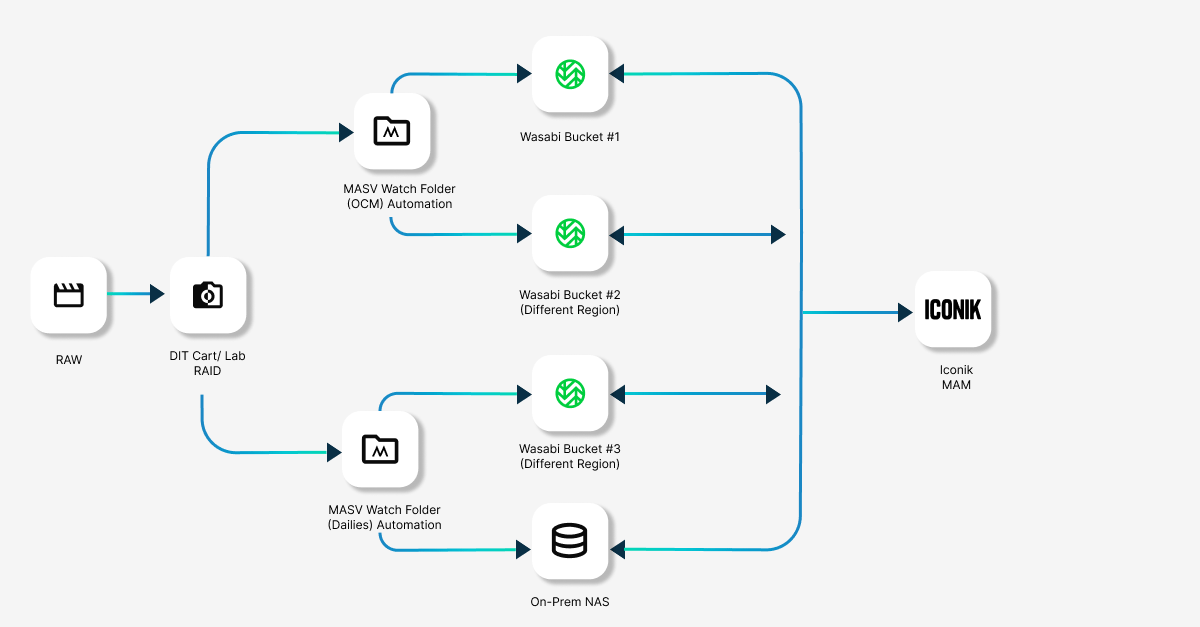
In this workflow, each media type is assigned its own automated Watch Folder and Portal. A single automated upload delivers to multiple backups and other destinations across regions, as well as notifying members of the production team.
Stage one: OCF/OCM ingest
- Offload camera cards to on-prem storage. Copy OCM to the production's shuttle drive, DIT cart, or lab RAID. Verify checksums here before anything leaves the set. Raw OCM files are usually massive and typically result in large volumes of data and related metadata.
- Let a MASV Watch Folder handle the upload. A MASV Watch Folder automation enabled by the MASV Studio monitors the offload destination, sending new media to a dedicated OCM Portal. Once it’s set up, the transfer runs in the background while the DIT checks files and applies a light color correction/grade.
- Bond with Multiconnect (optional). In MASV Studio, open Settings, select Speed, and check Enable Multiconnect. Attached internet sources appear under Available Connections: production Wi-Fi, Ethernet, a 5G hotspot, a tethered phone, a Starlink terminal, or other sources. Select the connections you want, and they’ll become Enabled Connections. MASV then splits the transfer across them simultaneously, while balancing the load and accelerating the upload.
💡Multiconnect tip: Use separate internet sources. Wi-Fi and Ethernet sharing one upstream connection, for example, will compete for the same bandwidth. If a connection degrades or drops, the others keep transferring and the app reconnects the degraded or dropped connection when service returns. Check out the help documentation for full setup instructions.
- Deliver to two destinations from one upload. Configure the Portal with two storage integrations, and when you upload files to the Portal, both destinations receive the same package at the same time:
- Iconik, backed by a primary Wasabi bucket. The production MAM makes incoming footage searchable, taggable, and reviewable, generating keyframes and video previews automatically. Wasabi's lack of egress fees keeps repeated proxy streaming from adding retrieval charges.
- A second Wasabi bucket in a different region. Every camera original gets a second, geographically separate copy without anyone starting a backup job.
Stage two: The mobile dailies lab
- Render dailies from the OCF. The mobile dailies lab handles color, sync, and transcodes, producing H.264 proxies and the production's other specified deliverables.
- Point a second Watch Folder at the render output. A second MASV Watch Folder automation sends finished renders to a separate MASV Portal. That Portal routes dailies to their own set of destinations.
- Deliver to three destinations from one upload. The dailies Portal then automatically writes to all three destinations at once:
- Iconik. Proxies appear alongside their OCF originals, ready for review and editorial pulls.
- A Wasabi bucket in a different region. Editorial media gets an automatic, geographically separate backup, just like the camera originals.
- An on-prem NAS at the editorial facility. Local storage for offline editing using a tool like DaVinci Resolve keeps cutting room performance independent of the internet connection.
Under this workflow, one offload and one render feed two Watch Folders, two Portals, and five storage/MAM destinations – with no manual transfers.
🔥 Note: MASV users who also use Wasabi hot storage can now harness the power of MASV Express, which begins ingesting files into Wasabi while file packages are still uploading. Express near-real-time transfer means teams can start working on those files immediately, instead of waiting for the entire file package to finish.
Send via MASV: Send files directly from Iconik
Along with ingesting into Iconik, MASV can deliver files in Iconik to external partners outside your primary storage architecture, whether it’s high-res plates to a VFX house, sharing original camera media with a finishing house, or sending assets to marketing teams.
After all, getting footage out of your pipeline is just as important as adding it. But traditional handoffs from cloud storage typically require downloading assets locally before re-uploading them to a file transfer service, which wastes time and doubles bandwidth usage by moving identical files across the network twice.
- MASV eliminates this redundancy by enabling direct transfers from within Iconik to any recipient, cutting out the unnecessary download step.
- The result is faster deliveries, lower bandwidth costs, and a simpler workflow that lets your team focus on creative work rather than being forced to dance the download/upload two-step over and over.
💡Read More: How Arrow Films Uses the MASV-Iconik Integration to Improve Transfer Workflows
Workflow Benefits
There are plenty of benefits of the automated dailies workflow with MASV, Iconik, and Wasabi:
Faster delivery. Starting uploads as cards are offloaded gives remote teams access hours earlier than waiting until wrap. Teams can leverage MASV's accelerated network, along with Multiconnect and Express near-real-time transfer, to speed up turnaround times.
One upload, every destination. A Portal delivers to all its connected storage integrations from a single transfer. Each file crosses the set's uplink once, however many destinations need it. That matters when the uplink is a 5G hub in a field.
Resilient connectivity. Bonded connections can get dailies out the same day when one connection falls short. Multiconnect adds no charge to your MASV subscription (carrier data charges still apply). A dropped link slows the transfer while the others keep working.
Cost savings. MASV and Wasabi's flexible pricing lowers operating costs. Wasabi's lack of egress fees keeps repeated reviews from adding retrieval charges.
No-code integrations. MASV, Wasabi, and Iconik connect natively. For Iconik, paste an App ID and App Token, choose a transfer direction, and select Connect. There's no custom code to write or maintain.
Nobody has to send a single "files have been uploaded" email. MASV Portals notify stakeholders when media is uploaded and when packages have reached their intended destination(s). You can even configure notifications to post in a Slack channel, so the entire post team is kept in the loop, automatically, and can begin work immediately without someone having to let them know.
Automate Your Dailies Workflow With MASV
Dailies don't have to mean late nights, manual handoffs, and anxious messages asking whether files have landed:
- MASV Watch Folders handle automated ingest
- Multiconnect creates a faster, more resilient connection
- Portals deliver to Iconik, Wasabi, and your on-prem NAS simultaneously
- The pipeline runs itself from offload to delivery (while keeping collaborators updated)
That means footage gets to those who need it faster, with fewer touch points, lower bandwidth costs, and no one stuck babysitting an upload at 2 a.m.
Ready to automate your dailies workflow? Get started with MASV right now or schedule a meeting with one of our workflow experts to talk through your requirements.
Related workflows


.png)