
Transfer While Files Are Still Recording


Take Back Your Time

Reduce Costs

Automate Ingest


.svg)
.svg)



Stop Waiting. Start Working.
Growing Files breaks this linear bottleneck by enabling uploads to start as files are being written, turning hours of dead time into active post-production.

Is Your Live Production Moving Fast Enough?
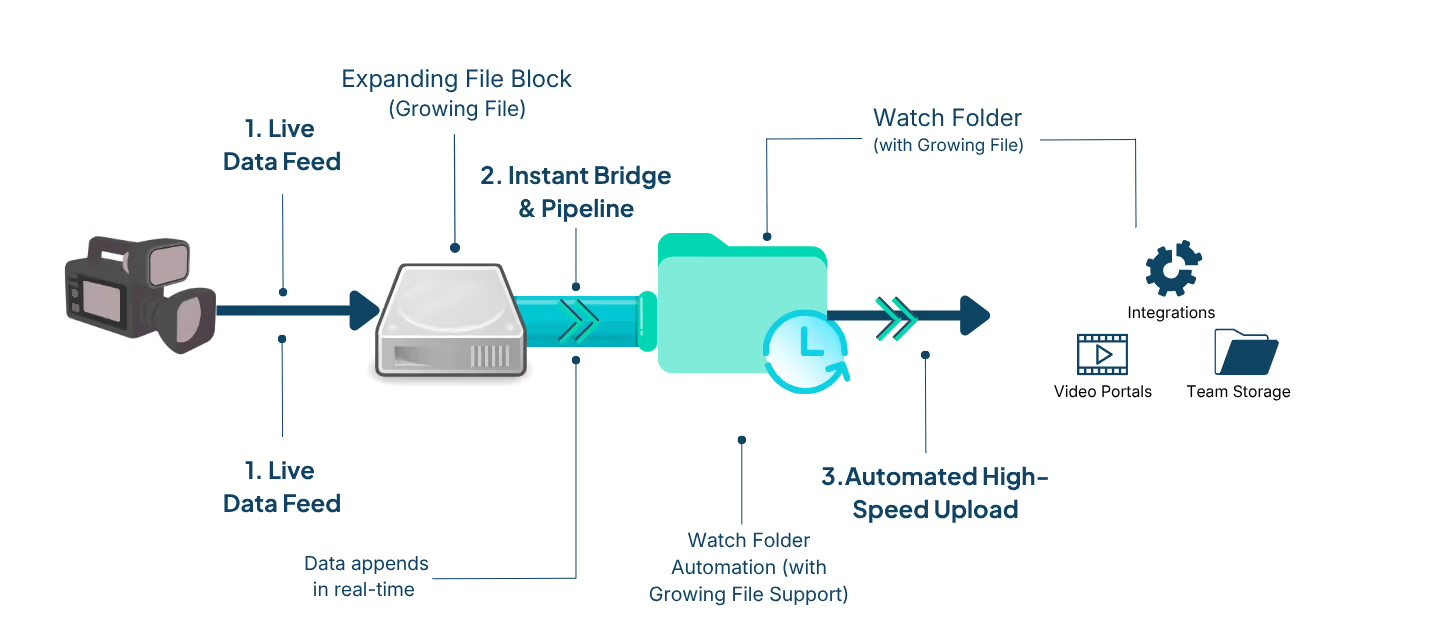
Intelligent Ingest for Continuous Recording
Technical Specifications & Integrations

Supported Professional Codecs
MASV supports all major growing file codecs used in high-end editorial workflows, including MOV and MXF containers. Supported MXF codecs include:
- AVC-Intra Class 50/100
- IMX 30/40/50
- XDCAM HD 50/35/25/18 RDD9
- OP1b

Direct-to-Cloud Routing
APIs, developer tools, and integrations with 30-plus cloud platforms allow Growing File transfers to fit perfectly into your media architecture.
Transfer footage directly into Amazon S3, Microsoft Azure, other cloud or on-prem storage, or your MAM of choice.
Why Customers Love MASV



MASV Features for Ultimate Velocity
Multiconnect
10 Gbps+ Optimization
Express
Frequently Asked Questions
A growing file is a media file that is simultaneously being written to disk and read or accessed. This is common in live sports and broadcast environments, where a continuous recording can last for hours and grow to hundreds of gigabytes before the event ends.
You can send growing files exclusively through the MASV Studio. Simply create a Send or Send to Portal automation, select a Watch Folder on your local machine, and check the Send Growing Files box in your automation settings. Any compatible file dropped into that folder will immediately begin transferring.
MASV Studio continuously monitors the file. By default, it checks the file size every 10 seconds. If the file size does not change during that check, the app recognizes that the recording has stopped and finalizes the transfer.
Yes. When configuring your Watch Folder automation, you can specify a list of file names or patterns to detect. Only matching files will be uploaded, and all others in the folder will be ignored.



