Accelerating the Sports Media Workflow With MASV and LucidLink

.png)
Key takeaways
- Post-game file transfer bottlenecks are real: Replacing fragmented consumer file links and physical drives with enterprise-grade, browser-based upload tools allows field photographers, videographers, and fans to upload game footage directly without managing individual software accounts or licenses.
- Automating metadata collection and cloud ingestion is a must: Custom upload forms can enforce metadata logging – such as camera specs and legal clearance – while automatically routing incoming media files directly into corresponding LucidLink cloud storage folders for remote editors.
- MASV-to-LucidLink routing accelerates editing: Ingesting uploads straight into a LucidLink Filespace via MASV enables remote editors to edit live footage instantly from cloud storage.
Ask anyone in sports production teams that work with multiple platforms and they’ll tell you the hardest part of game day is getting footage off the field – particularly during special events or games on the road:
- Long before the final whistle blows, media assets from staff shooters and freelancers are already moving. Thousands of phones in the stands catch the angle your crew missed.
- But then the stadium Wi-Fi buckles, transfers grind to a halt, and a folder lands somewhere no one can find.
- Eventually, the team gives up and sends a consumer-grade file sharing link for you to download yourself while they head home for the night.
Every media team has a trick play for this problem, but none of them ever really score. So let's fix the sports production workflow properly with a pair of powerhouse tools: A MASV Portal for every contributor, feeding LucidLink, with all of it up and running in an afternoon.
What Stalled Footage Costs a Sports Media Workflow
The sports media workflow has changed fundamentally over the past decade. The rise of over-the-top (OTT) platforms like Netflix and Prime Video has created significant new revenue opportunities, and short-form social media content on TikTok, Instagram, and YouTube has fundamentally changed how fans engage with sports. With Deloitte research showing the importance of winning over younger fans, sports organizations are under intense pressure to produce and distribute content at speed.
This shift means sports teams, leagues, federations and even broadcasters have been forced to rethink how they manage media operations that now depend on tightly integrated workflows using multiple teams requiring remote access to time-sensitive content.
However, footage stalls during live sports workflows when every contributor delivers using their own tool, on their own schedule, with nowhere shared for assets to land:
- One shooter dumps a card to a personal Dropbox that takes the better part of a day to transfer to your internal systems, or a freelancer emails a transfer link that expires before anyone finds it.
- Nobody knows a file has arrived until someone asks in three different Slack channels.
- The fan three rows up who caught an incredible, trending video clip has no way to send it to your media team.
Whether you run live sports events as a pro club or league, or are involved in live sports broadcasting, all of this costs you: Remote editors paid to download, organize, and track who shot what are editors who aren't cutting, and a stale highlight earns a fraction of its reach.
Deloitte also reports that 53% of Gen Z sports fans now prefer highlight reels over full live matches – meaning key moments that get posted late lose critical real-time engagement.
Over a full season across every venue you cover, these issues and delays add up.
.jpg)
Traditional File Transfer Options for Sports Media Teams
Three workflow fallbacks familiar to those in the media industry come up every time:
- Manual delivery: Shipped hard drives. Not pretty, and rarely on time, but the job eventually gets done.
- Consumer transfer tools: WeTransfer, Dropbox, and Google Drive – everyone knows how they work, and everyone knows how much time they burn. A familiar form of punishment.
- Legacy managed file transfer: Aspera or Signiant provide enterprise-grade transfer, with the price tag and tedious enterprise deployment cycle to match. You'll be halfway through the season before either one is fully set up.
Each of these can work in a pinch, but can’t provide what many sports organizations need: ingesting footage from a fan in the stands as easily as from staff, capturing legal clearance and metadata at the moment of upload, automatically routing every file to the right folder, and notifying the edit team on arrival.
Why HDDs, Consumer Transfer, and Legacy MFT Fail at Major-League Scale
Consumer transfer tools were designed to send one file between two people who know each other. Links expire, free tiers choke on huge data volumes, metadata is whatever the sender typed into a message box, integrations with digital asset management tools are practically nonexistent, and there is no arrival notification.
Read More: How MASV Powers Fast Transfers for Miami Heat
Hard drives ride in delivery trucks, can get stolen or lost, and even in the best-case scenario usually don’t arrive at your centralized storage until the next day.
Legacy enterprise transfer fails on friction. While Aspera and Signiant can do some of the job once up and running, their real cost is everything around the transfer – such as long procurement and provisioning cycles, tedious client installs on every machine (and related tech support calls), per-seat licensing, and seemingly endless IT hours keeping it all together.
Either way, however, a freelancer hired this morning can't deliver using legacy MFT without a seat and an install – and a fan in the stands never will.
Whichever route you choose, you end up spending game night worrying about the same three things: where each file is going, when (and how) it will get there, and whether you’ll even know when it lands.
The Fix: MASV Portals Feeding LucidLink Workspaces
Here’s a workflow that eliminates these three worries during live events for good: One MASV Portal per contributor type maps where each file gets sent in the LucidLink Filespace, MASV no-code workflow automation removes manual transfer steps, and automated notifications ping everyone who needs to know.
- MASV Portals allow anyone with a link to upload directly to your team, shared storage, or asset management platform without an account. Files land in one place, every time, so your editors can stop chasing assets and start cutting.
- LucidLink allows your edit storage to live in the cloud, so the moment a file lands, anyone on your team can start working on it from anywhere without syncing, downloading, or waiting.
As Partner Success Solutions Engineer at MASV, I work with plenty of sports content and live broadcast organizations with these exact same problems. I'll walk the build the way I'd set it up for them – stand up the first Portal, then duplicate it for each team.
Photographers
Here's the first Portal, tab by tab:
- Open Request Files with Portals and select New Portal, then Custom Portal.
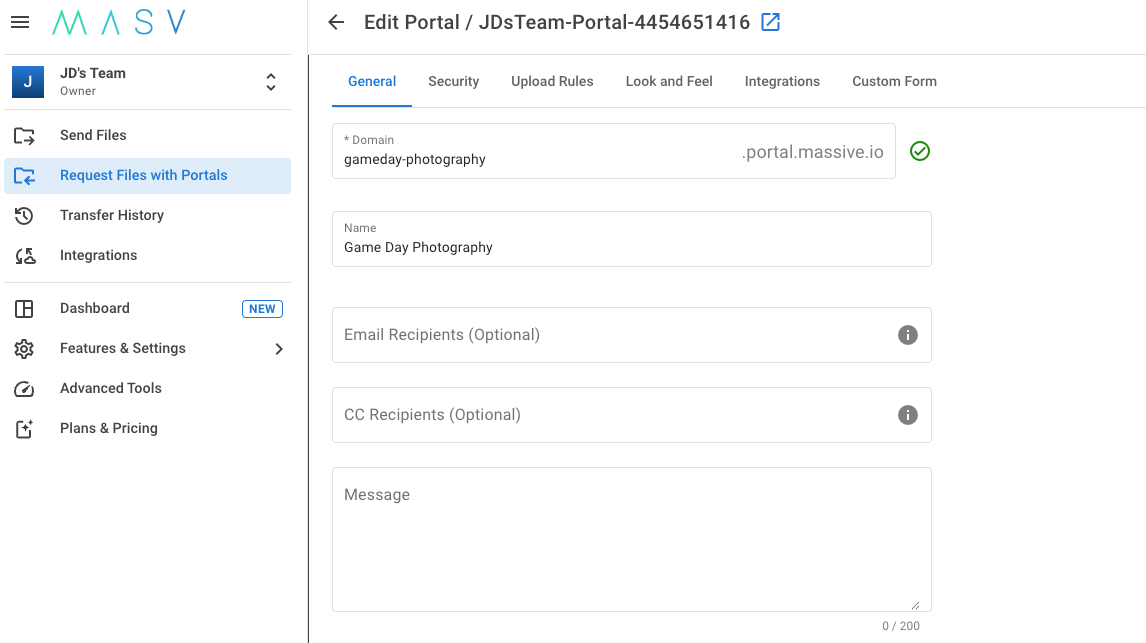
- On the General tab: name the Portal "Game Day Photography," give it a subdomain your shooters will recognize, and add the coordinators who should be kept updated.
- On the Look and Feel tab: add your team's logo, a custom background, and your accent color to give collaborators a seamless experience.
- On the Integrations tab: attach the storage integration that backs your LucidLink Filespace and set the target subdirectory to your photography folder. Every upload now routes itself.
- On the Metadata Form tab: add a Custom Form with the fields you use, such as shooter name; staff or freelancer; pre-game, game, or post-game; and a shot description.
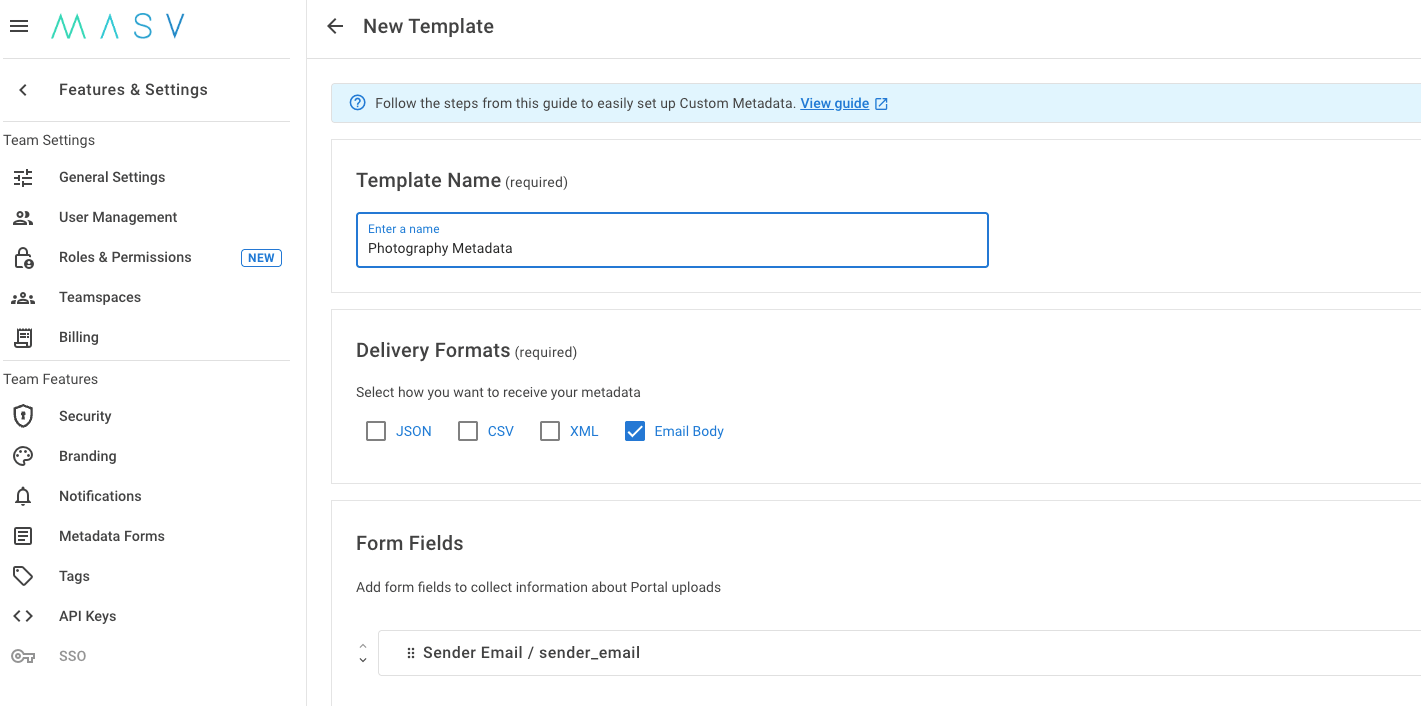
- Mark each field as Required and select Create.
Those fields might not look like much until the first time an editor doesn't have to guess who shot what – and since each field is required, nothing gets uploaded without them.
Videographers
Create your next Portal, point the custom LucidLink path at your video folder, and apply your video metadata form template with items like camera body, codec, resolution, and whatever else your workflow needs.
MASV has no cap on file package sizes, so a full day of 8K or RAW lands with no issues. Shooters can drag-and-drop files into the browser-based Portal on any device, with all files landing in the right LucidLink folder.
Fans in the stands
A branded fan Portal connected to a QR code on the video board can be quickly configured to deliver directly to a fan submissions folder in LucidLink. Fans scan the code, land on your branded page, and upload their footage in seconds with no app installs or accounts to manage.
A short Custom Form can then capture seat, section, the player, the moment, and legal clearance via a terms-of-service checkbox that makes user-generated content usable. Every clip arrives ready to use with a usage agreement attached.
Read more: The importance of video metadata for live sports workflows with Iconik
One metadata form template per team
Metadata form templates from MASV make this whole build repeatable. Open Metadata Forms in the MASV Web App sidebar and save each team's form as a reusable template for each use case.
From then on, you can apply the matching template to any Portal you create or edit instead of rebuilding fields by hand. Design each team's form, and it stays consistent across every venue and every event for the rest of the season.
Each package lands in LucidLink with its metadata right there as a sidecar file, so your MAM or assistant editor both know what they've got without opening a single clip.
How the MASV + LucidLink Workflow Scales
While a standard enterprise deployment usually means a rollout for IT and a training session for everyone, this entire workflow can be set up and ready to use between the morning production meeting and tip off or puck drop.
When you hold this workflow up against everything a modern media operation needs, it checks every box:
- Files arrive in the right folder with the right metadata because the form is required, quick, and easy to fill out, while storage credentials are never shared with anyone.
- Files move quickly and with minimal latency thanks to the MASV accelerated edge network of 750+ global accelerated points of presence (PoPs) combined with chunked transfers sent in parallel.
- Remote venue connectivity issues become a thing of the past thanks to Multiconnect channel bonding that pulls from multiple network connections simultaneously (so even stadium Wi-Fi becomes usable for large file transfers).
- Automatic retries from the point of interruption ensure that even if a connection drops mid-transfer, MASV picks up where it left off rather than starting over.
- Transfer verification using checksums confirm every file arrived intact, so you're not discovering corruption in the edit bay.
- No-code integrations and automation with LucidLink, Amazon S3, Iconik, and other cloud or on-prem destinations mean you can quickly stand up automated workflows without a heavy IT lift.
- Enterprise-grade security using TLS 1.2+ and AES-256 encryption keep content safe, compliant, and secure .
Teams can use this workflow to get content ready for content distribution to multiple channels for post game analysis, social media channels, and other digital platforms to help boost viewer engagement. Social media management for sports organizations often includes distributing short-form clips to engage online fans.
Supercharging the Sports Media Workflow With MASV + LucidLink
A sports media workflow built on MASV and LucidLink helps media teams move fast and efficiently to win big on game day. Manual delivery buries footage in logistics, consumer tools drop the metadata and the rights, and legacy platforms bill you before the first file even moves.
On the flip side, taking a couple hours to set up a set of MASV Portals gives every contributor – from staff to fans in the stands – a single link that delivers files tagged, cleared, and in the LucidLink Filespace your editors are already working from.
Create as many Portals as you want, for free, and start ingesting footage from your crowd and crew at today's game. Get started with MASV today or schedule a meeting with one of our workflow experts to learn more.
Related workflows